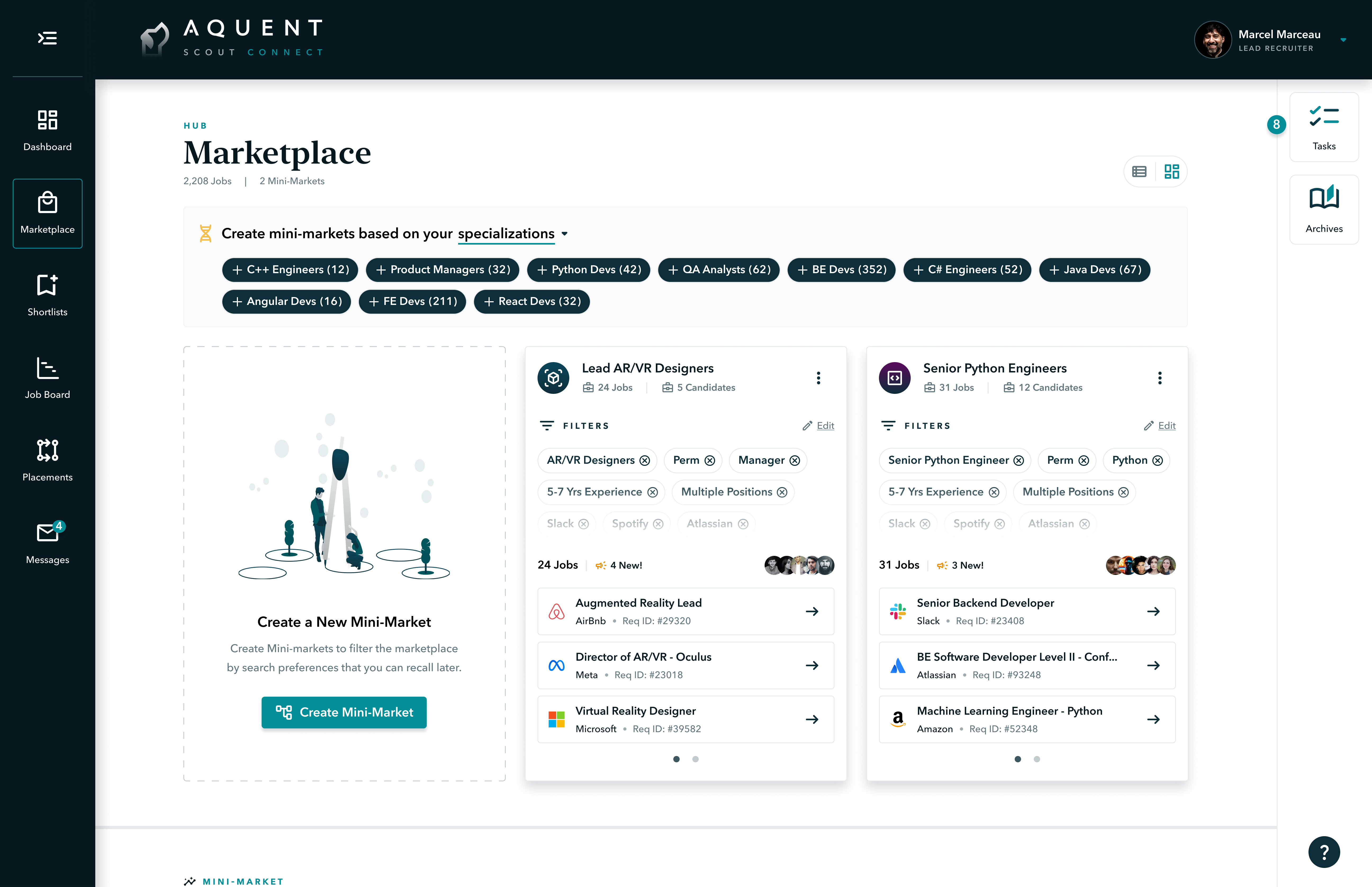
The layout equally prioritizes mini-market creation and entry. The various mini-markets are displayed as cards with key information including filters, jobs, and candidates.
.jpg)
The Scout Talent Marketplace Redesign
Led a team of one designer, one machine learning engineer, and one research assistant to reimagine the Scout Marketplace through all phases of the Design Thinking process. Scout is a two-sided talent marketplace that facilitates hiring activities between search firm recruiters and internal hiring teams.

Figma

Maze

Whimsical

EnjoyHQ
Summary
• Conducted a heuristic evaluation of the existing product; crafted UX themes for Northstar vision
• Facilitated generative user research to map user workflows and mental models
• Managed UX research repository in EnjoyHQ/Dovetail
• Synthesized research findings into research stories and presented to leadership
• Devised high-level 0 > 1 product design strategy
• Translated research findings into a network based information architecture
• Crafted interaction and visual design in lo-fidelity and tested design solutions in Maze
• Created animated prototypes in Figma
• Rebranded the UI and created an atomic design system
The problem(s)
Solving for a clunky <job search> experience
In general, Scout, an ML-powered recruiting platform, had systemic usability issues rooted in the IA. The effect, over 8 years, was a 6% client retention rate and -$3M/year in profit. I was brought on by the CTO to reimagine the platform's experience in an incubator setting.

Recruiters had to sift through thousands of jobs
The old experience had an "open season" marketplace that forced users to sift through thousands of jobs with no ability to organize them.

Users were unable to save their searches
Carefully curated job searches were lost in the ether upon logging out. As a hack, users kept several tabs open to save their searches.

Deep IA led to heavy interaction costs while browsing
Opting to view a job's details in the marketplace took users to a sub-page, which increased interaction costs and page loads

The absence of candidates was a big missed opportunity
Candidates were not a first class entity in the backend, which led to tedious usability loops, and was a missed opportunity for ML job-to-candidate matching.

Slow user productivity and momentum
The complexity of the product made it difficult for users to be productive and know what their next-best actions or tasks could be.

Inability to share jobs and collaborate with team members
Because of a desire for limited permissions for team members, most recruiting firms elected a single lead to have a Scout account. As a result, all team collaboration occurred off-platform.
step 1
Heuristic evaluation
When I started at Aquent, I conducted a heuristic evaluation of the Scout recruiting platform, discovering 115 usability issues ranging in size from low-hanging fruit to critical issues rooted in the information architecture. I simplified the complexity by devising four UX themes that tied seemingly disparate issues together in a common thread. I then presented my findings to C-level to get buy-in. This presentation mobilized a full platform redesign.
.png)
Step 2
Empathize & synthesize
The primary research goal as to define our users' natural workflows as they sought to "discover" quality jobs to work on. The secondary goal was to understand the most important qualification factors.
.png)
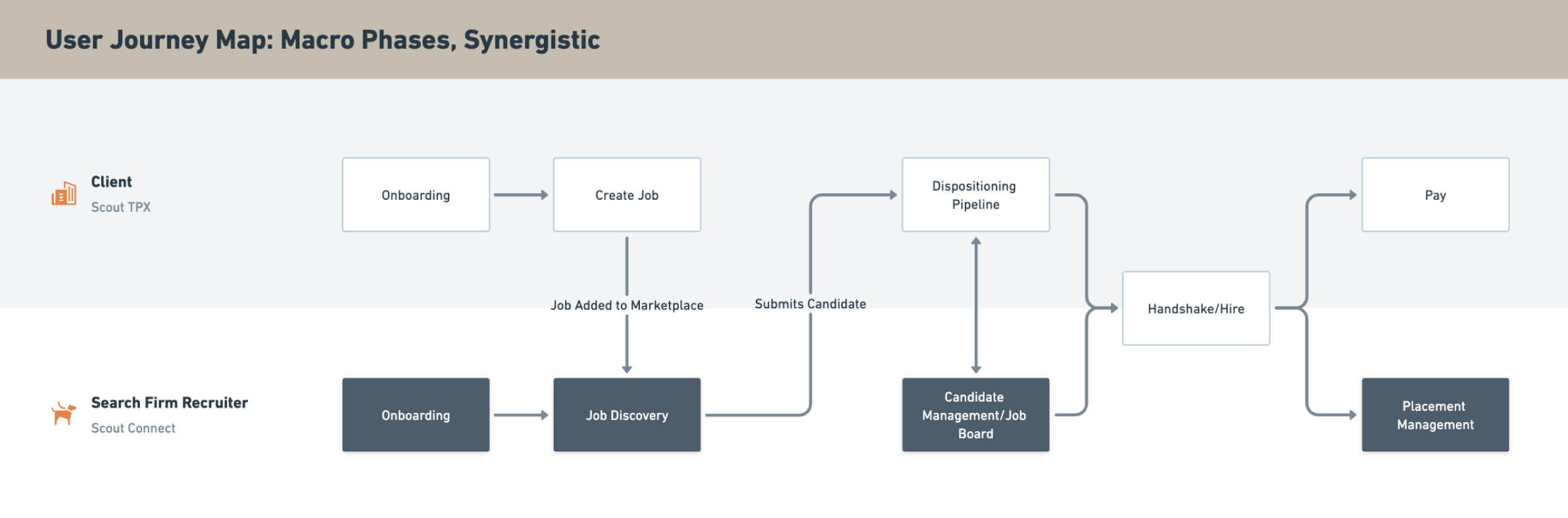
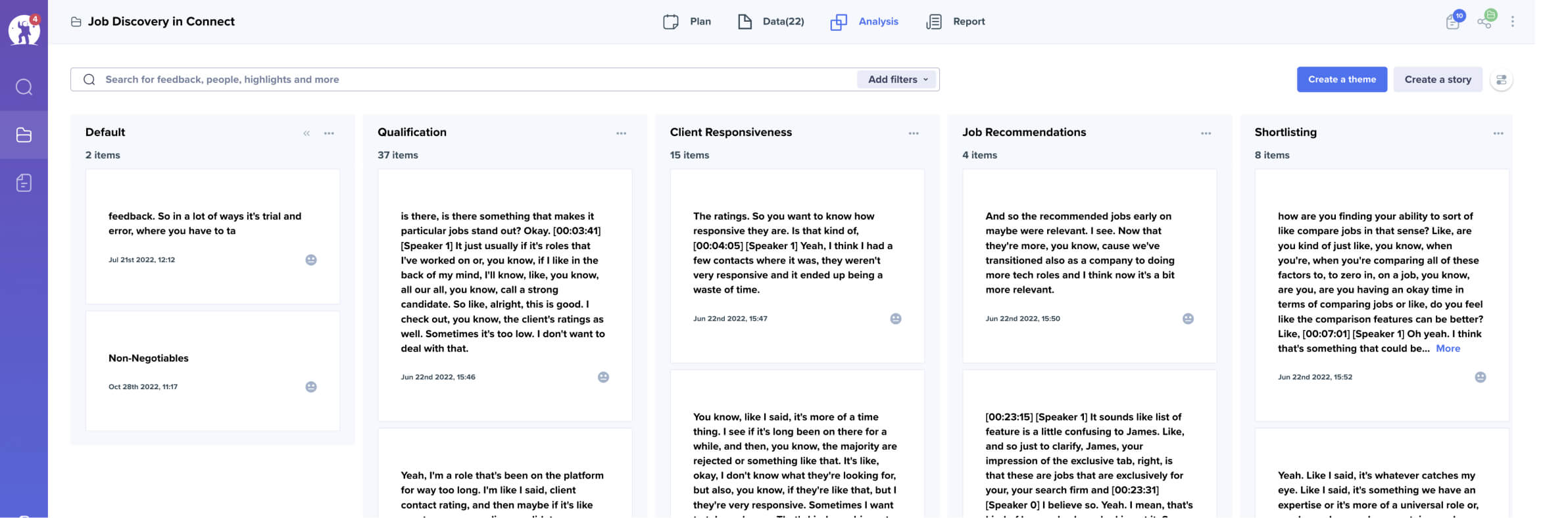
.png)
Step 3
Immersive ML+UX strategy
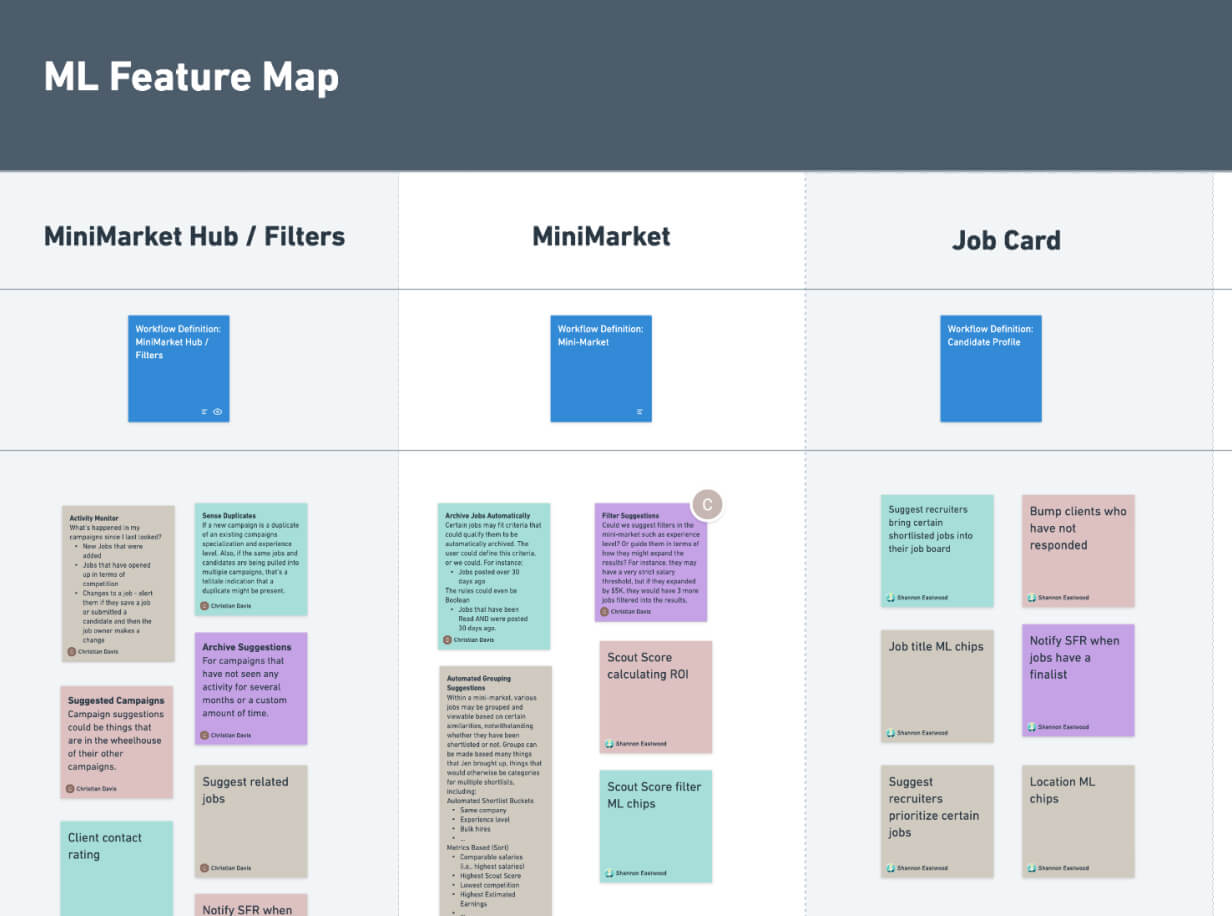
Opportunity mapping: I partnered with the machine learning team to help create an immersive machine learning experience in the UI. While assessing user workflows as defined in UXR, we simply asked ourselves, "How might we augment this workflow?" The result was an immersive machine learning strategy that augmented our users’ workflows.
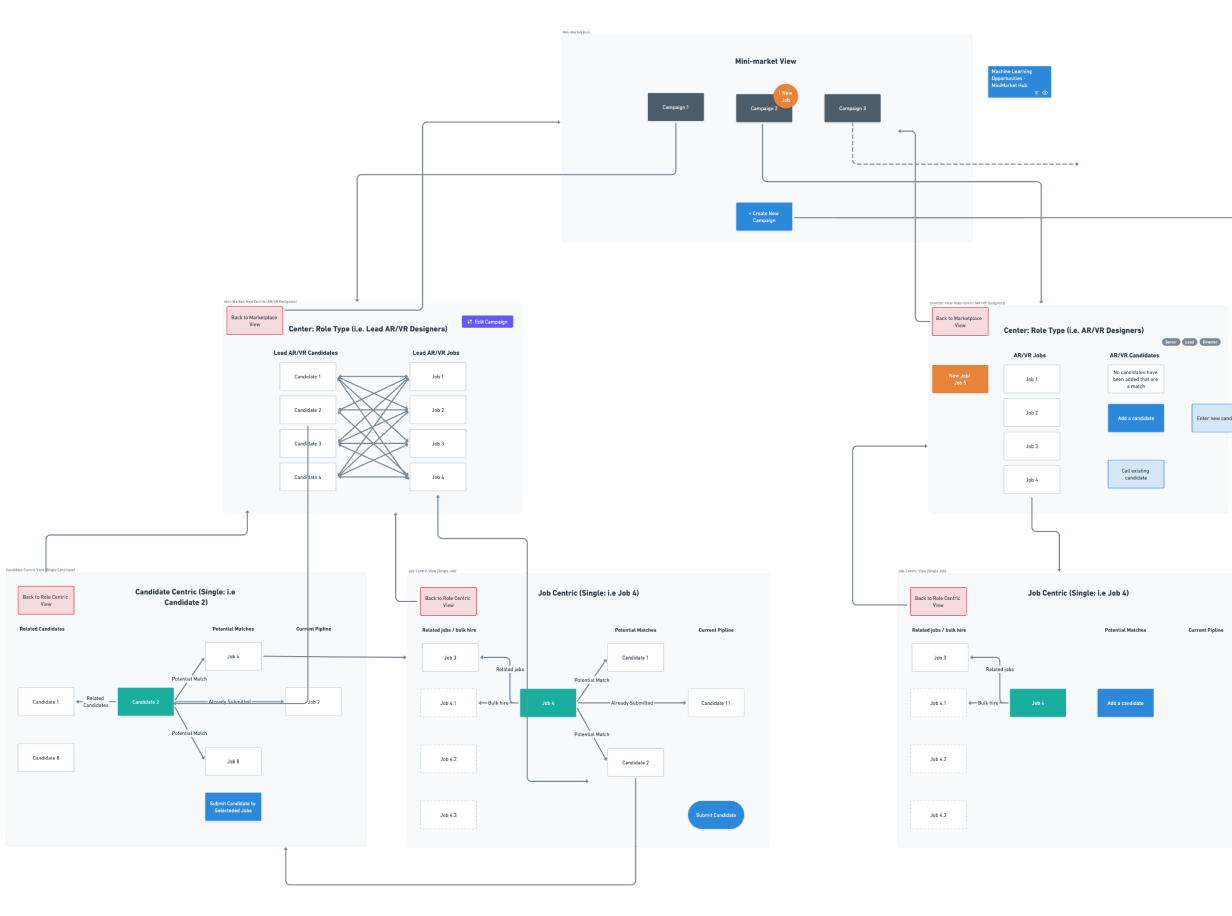
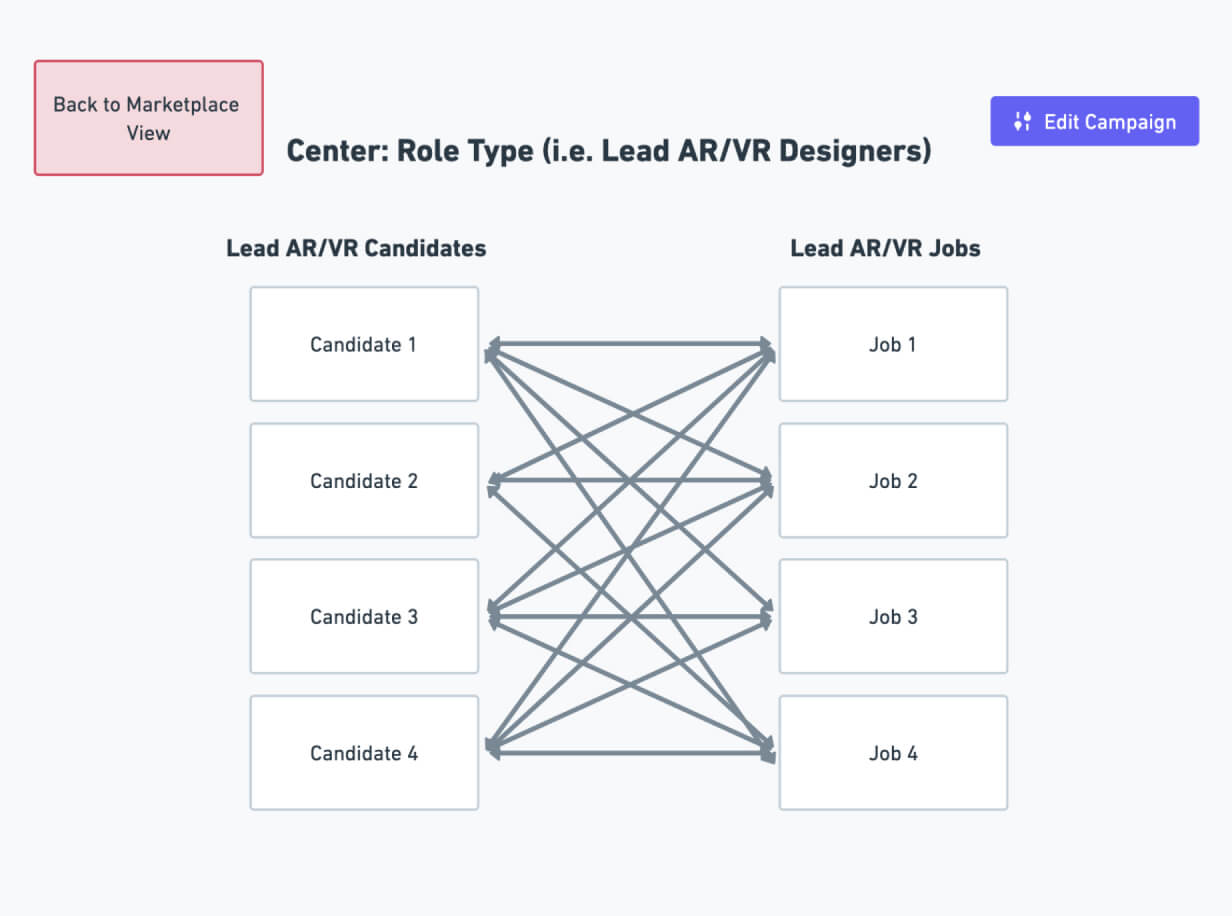
Network IA: The idea of a network based information architecture is to facilitate novel workflows and to eliminate data silos caused by hierarchal IAs, which ultimately lead to dead-ends. It puts all data entities (i.e., candidates, jobs, companies, skills) in relation to each other, which is the lifeblood of our ML strategy. So essentially at any given point, the user is viewing the network from a contexualized vantage point without creating a definitive hierarchy.
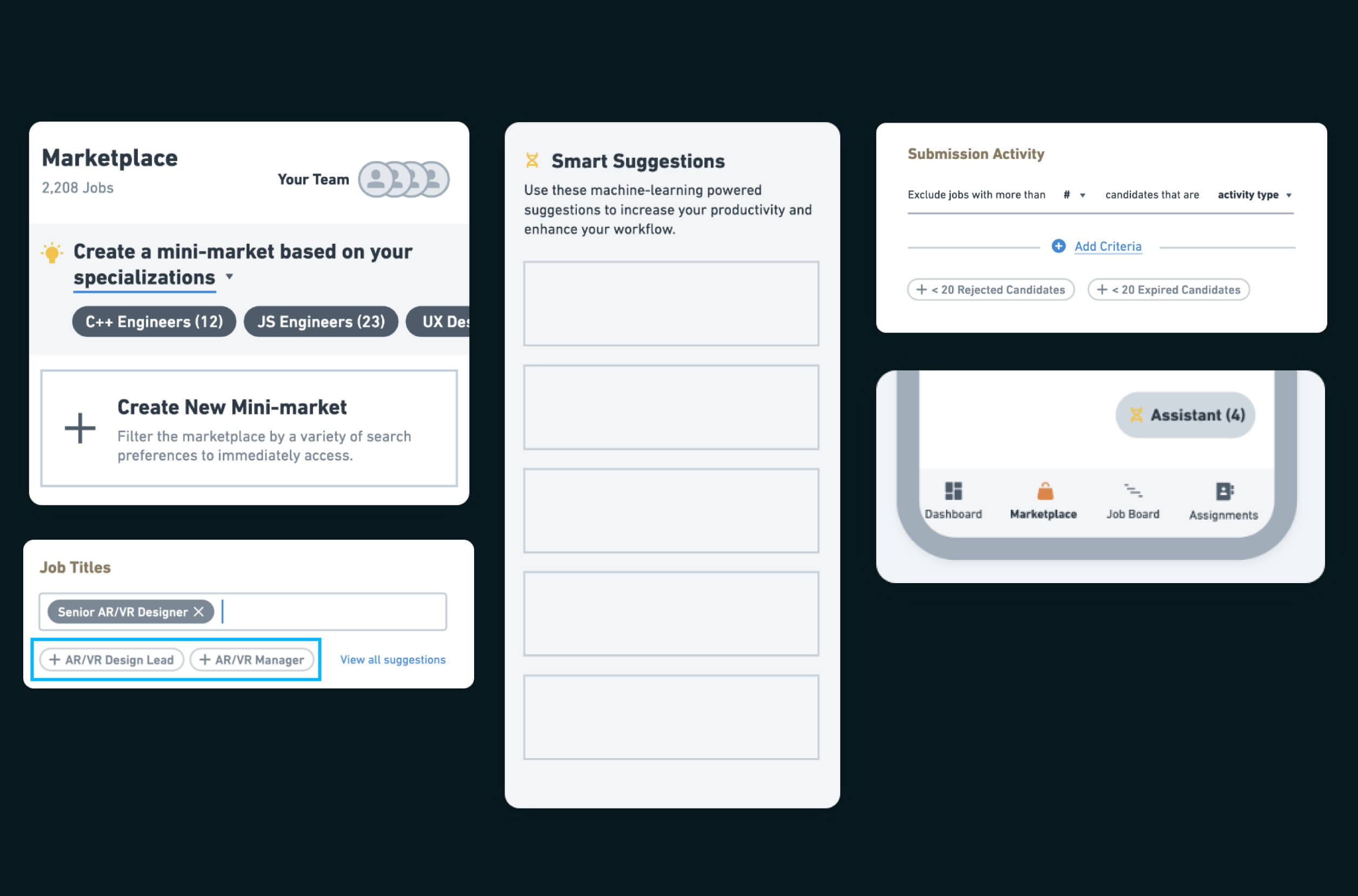
ML Components: Pretty soon, the Machine Learning UI components began to take form: ML Chips, a Smart Suggestions slide-out (i.e., Tasks). Because the goal was to create an immersive ML strategy in the UI, the components took on subtle forms to guide increased user productivity.
The Solution
Translating <research stories> into visual design.
For the next six months, I worked with the Northstar team to reimagine the information architecture in a way that directly translated research stories into the visual design. Our KPIs revolved around the hypothesis that the redesign would result in clients receiving more qualified candidates in less time from partners, increasing the probability of a successful hire downstream.

Automated <mini-markets> to match user mental models
The marketplaceI was replaced by mini-markets that pre-qualify jobs based on custom preferences, filter out irrelevant jobs, and double as saved searches. Mini-markets also flattened the IA, subsuming job details and saved jobs to reduce interaction costs.

Introduced <candidates> as first-class data entities
Adding candidate data enabled job-to-candidate matching, which leveraged ML to dynamically rank candidates against jobs. It also precipitated key features such as candidate recycling, multi-submit, team candidate sharing and more.

Added <teams> to accelerate search firm synergy
The Teams feature allowed team leads to communicate directly on-platform with their direct reports, and limited permission views gave leads more control.

ML-powered <tasks> to augment user productivity
The Tasks feature revolutionized the way Scout utilizes machine learning, acting as a private assistant for recruiters to skyrocket user productivity.
the old ui
<Before> the redesign
Here is a video of the old UI. To reiterate the broader problems within the original UI:
Candidates were not backend entities leading to poor recycling of user efforts
Deep IA led to extraneous clicks and page loads
No ability to organize while browsing thousands of jobs
Because they were unable to save searches, users had to recreate searches each time they entered the platform
Unable to share jobs with team members
Job card lacks clear visual hierarchy and is missing key actions
the new ui
<After> the redesign
The redesign solved for these problems by:
Adding candidates as entities within the data architecture to enable for job-to-candidate matching
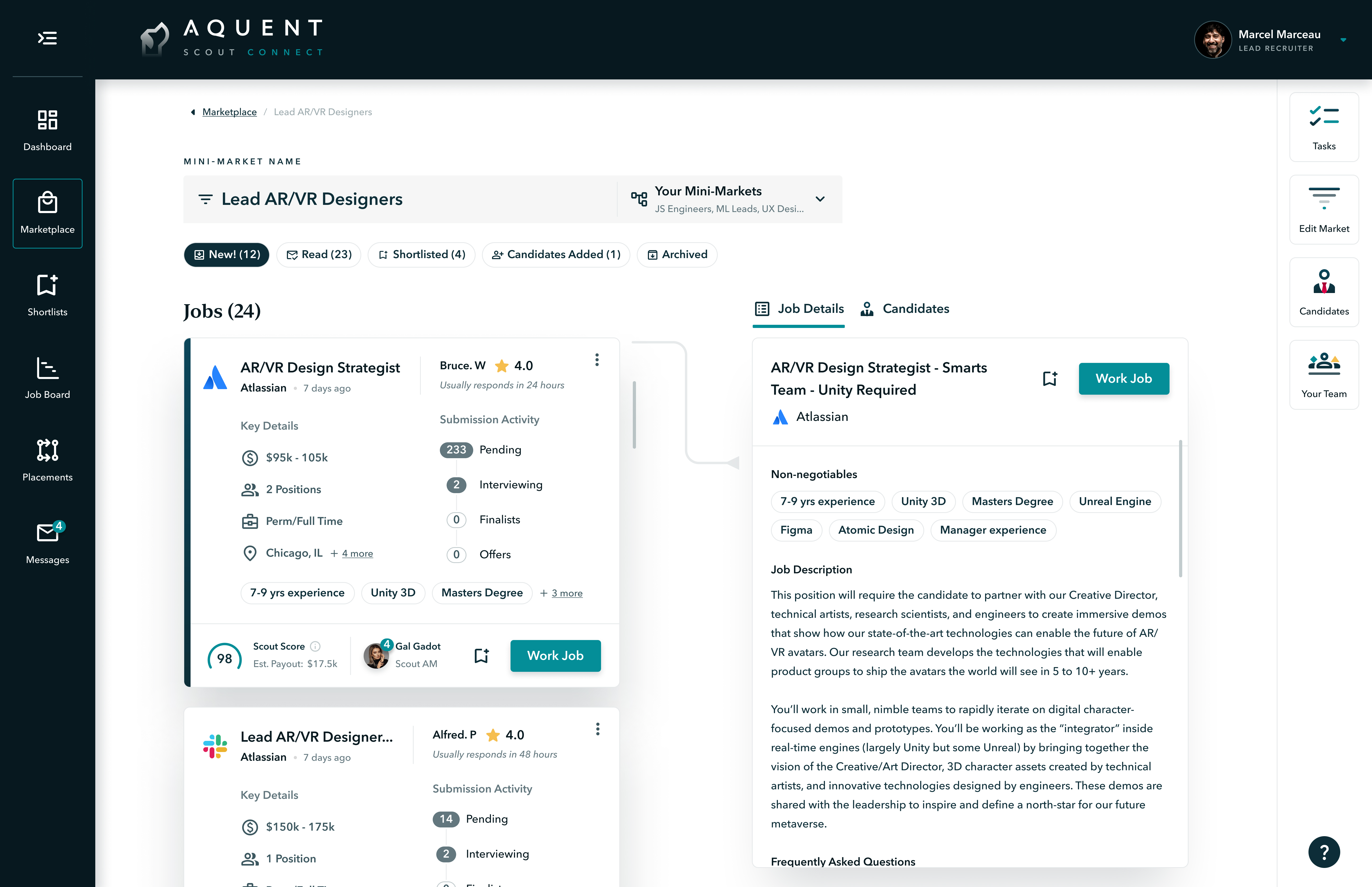
Utilized a flat IA so that job details were visible next to the job card, not on a different page
Introduced campaigns or mini-markets to organize jobs by specialization and experience level
Campaigns were essentially saved searches that prevented users from having to recreate searches each time
Teams feature with limited permissions views were introduced to enable team collaboration
Job card redesigned with clear visual hierarchy to improve readability and actionability
Feature 1
Mini-markets
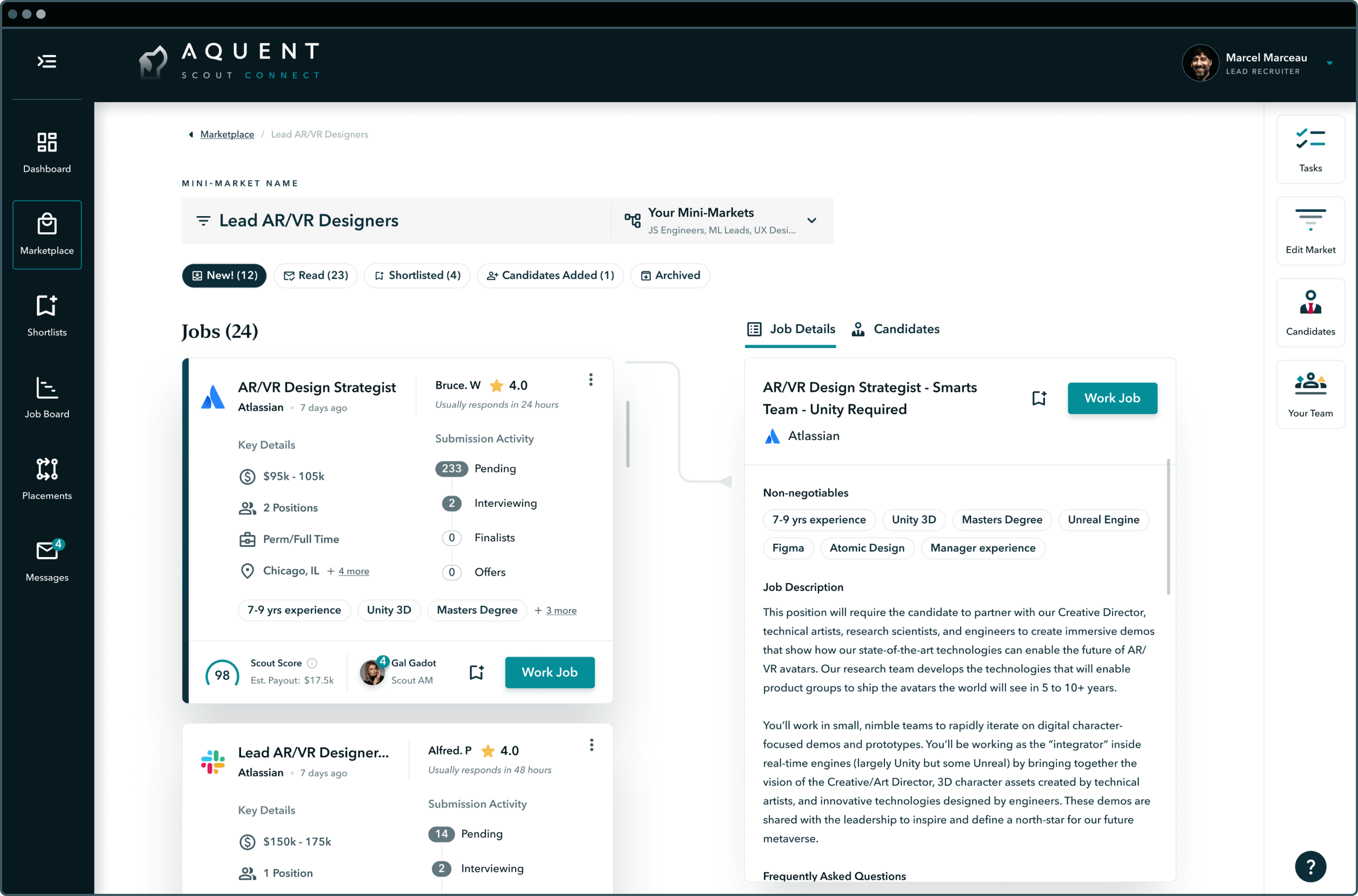
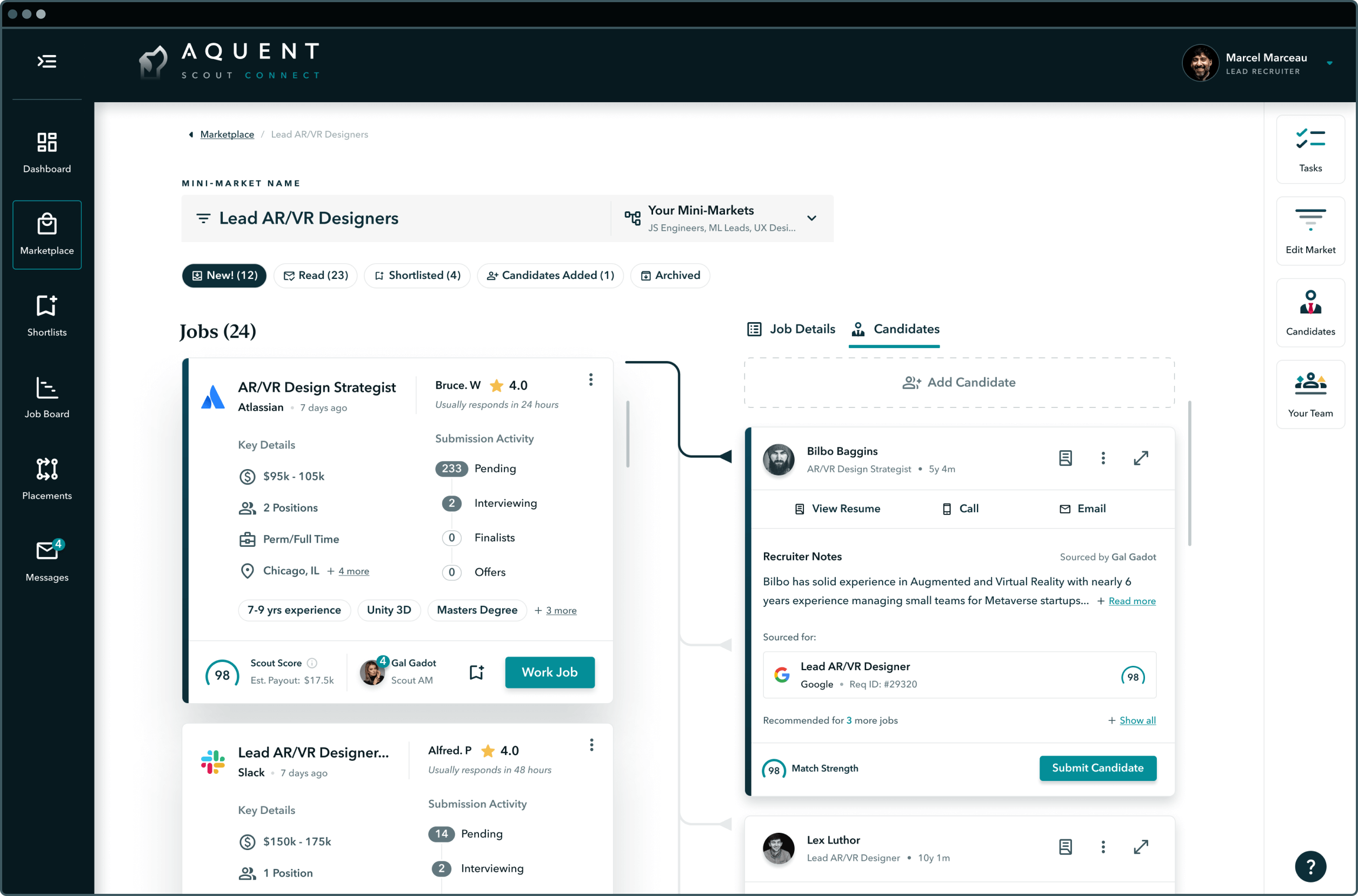
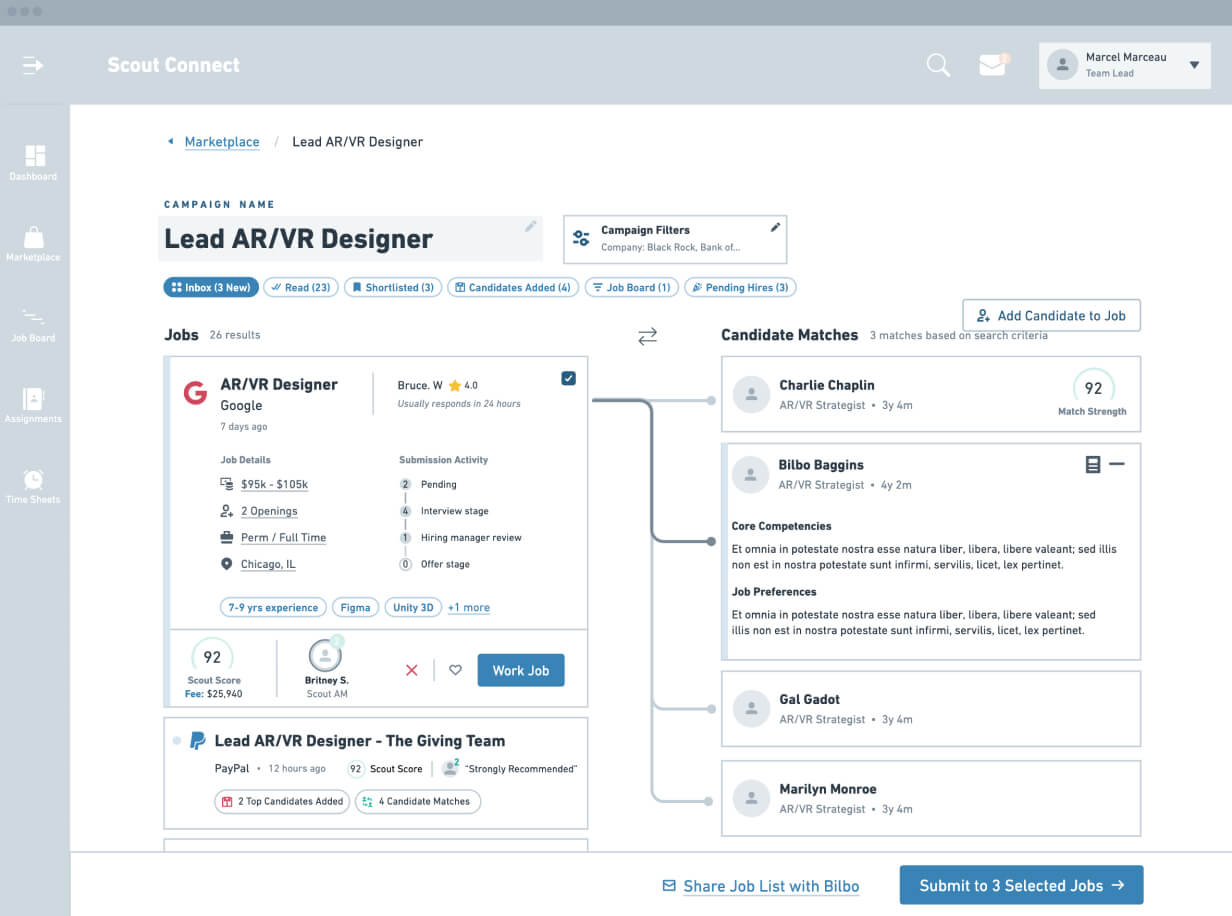
In research we learned that recruiters think of their work in terms of campaigns: JS devs are in one proverbial bucket, UXers in another, PMs in another. To mirror this mental model, I based the IA around "mini-markets", which are defined by a set of filters such as specialization, experience level, estimated earnings and more.
Mini-market
Job-to-candidate matching
Because mini-markets are centered around a job type, we were able to use ML to create matches between jobs and candidates. Upon selecting a new job, the candidates in that mini-market shuffle and are <dynamically ranked> according to that job's skill and experience requirements, and other attributes that were parsed from the resume.
1.1 Update mini-market name
Recruiters can update their mini-market name in this Google Docs inspired name field.
1.2 Change mini-market dropdown
The dropdown next to the name field allows users to quickly navigate between mini-markets.
1.3 Candidate's tab
The Candidates Tab allows recruiters to build a talent network for that mini-market.
1.4 Shortlisting jobs
Favorited jobs are automatically organized in the user's Shortlists Tab.
Feature 2
The job card
The old job card lacked a clear visual hierarchy, with homogenous elements lending to poor scan-ability. The redesign employed Gestalt principles and pre-attentive attributes to guide user attention, thereby accelerating the job selection workflow.
.jpg)
The job card
Redesigning for minimalism
The old job card was breaking Jakob's heuristic principle of minimalism, as it displayed extraneous information and it missed out on key interactions like sharing with team members.
.jpg)
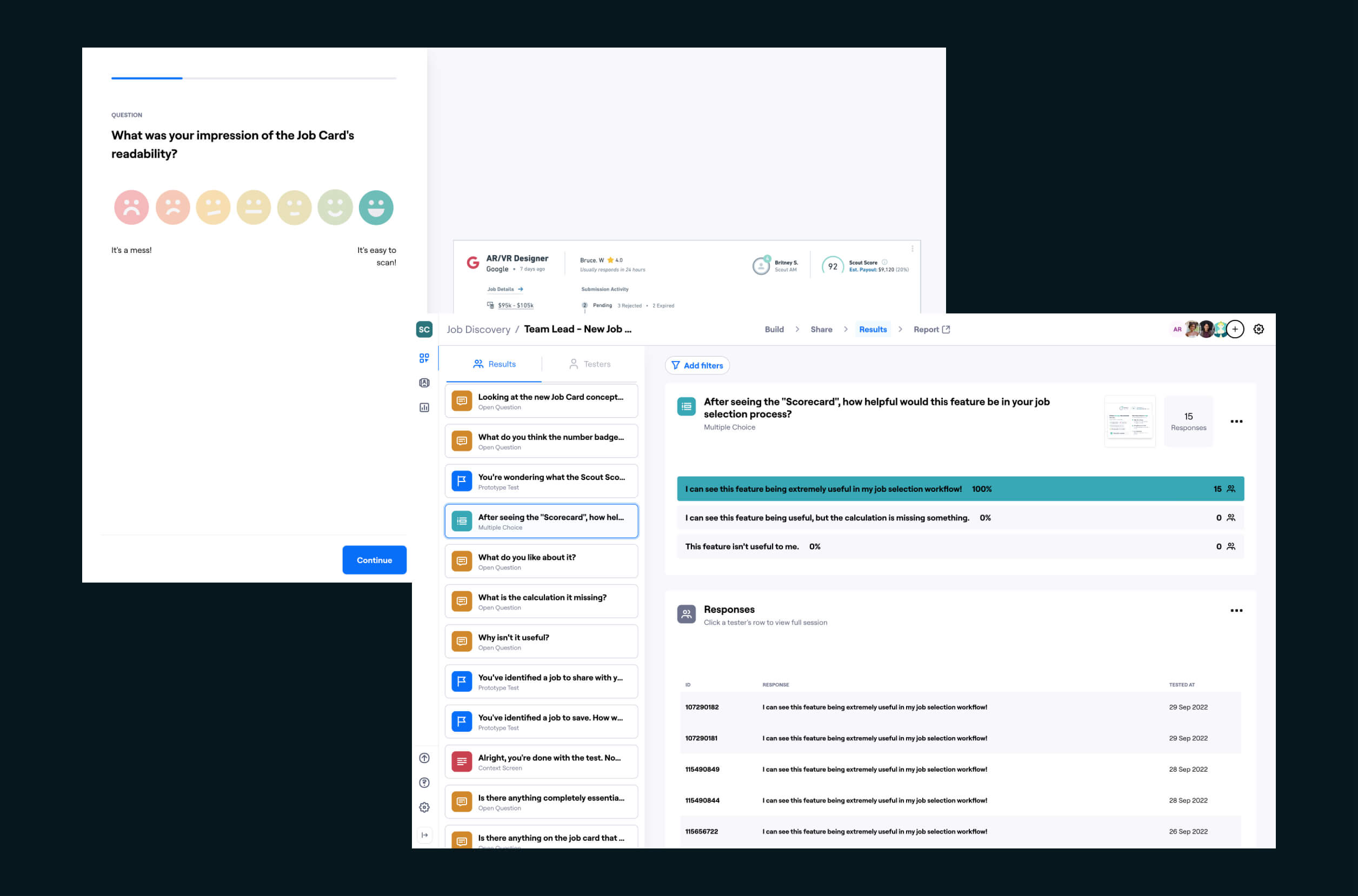
2.1 Assign job to team members
The assign feature fostered team synergy by allowing Recruiting Leads to assign jobs to teammates, who then source and submit candidates back to the Lead.
2.2 The Scout Score scorecard
This ML generated score gives recruiters a personalized rating on each job based on their probability of a successful hire.
Feature 3
Market hub
The marketplace hub is the entry point for the various mini-markets it contains. It also fosters the creation of new mini-markets with illustrations and machine-learning sorcery. The UI intentionally gives visual prominence to both of those flows (mini-market creation and navigation).
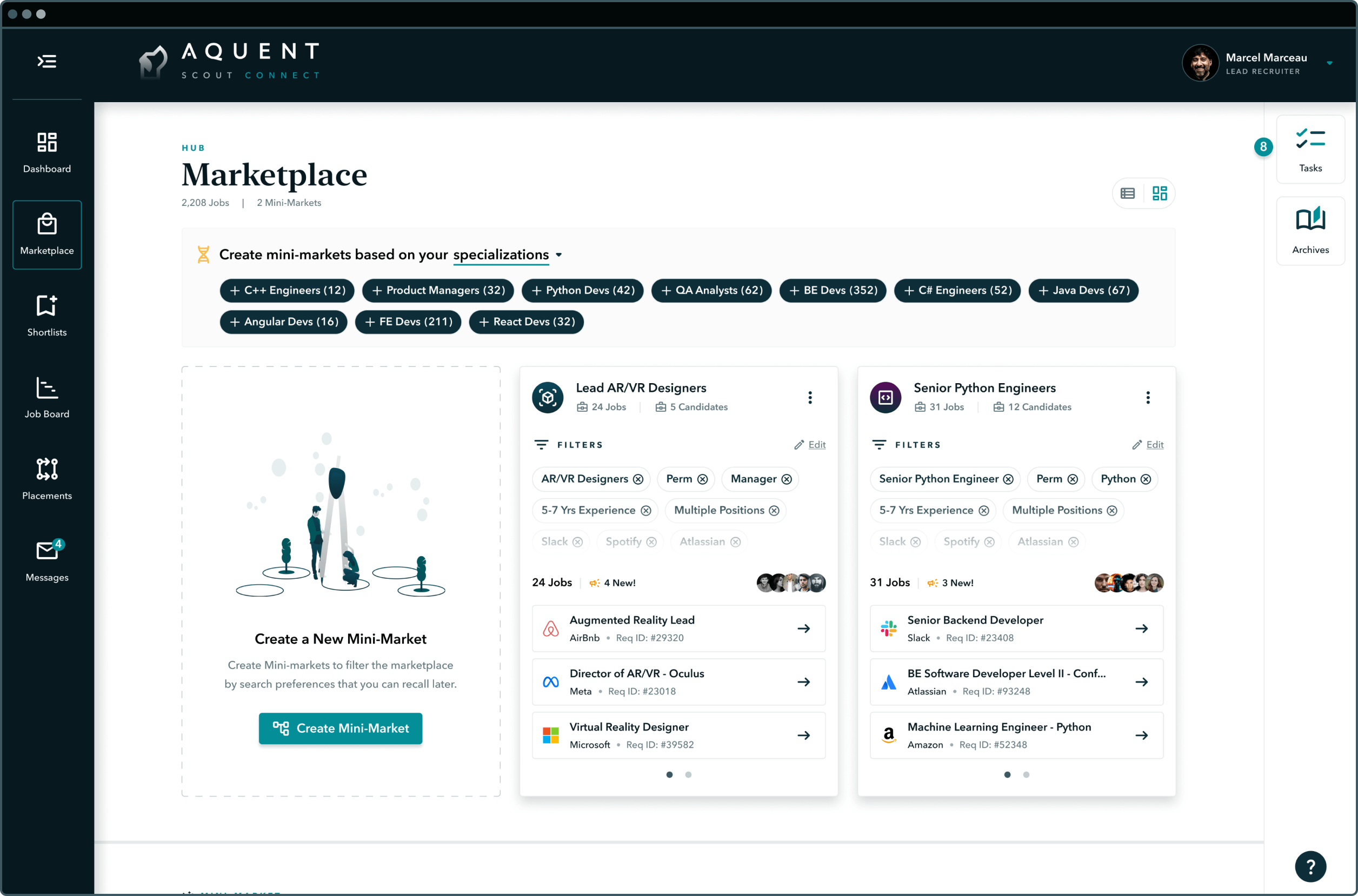
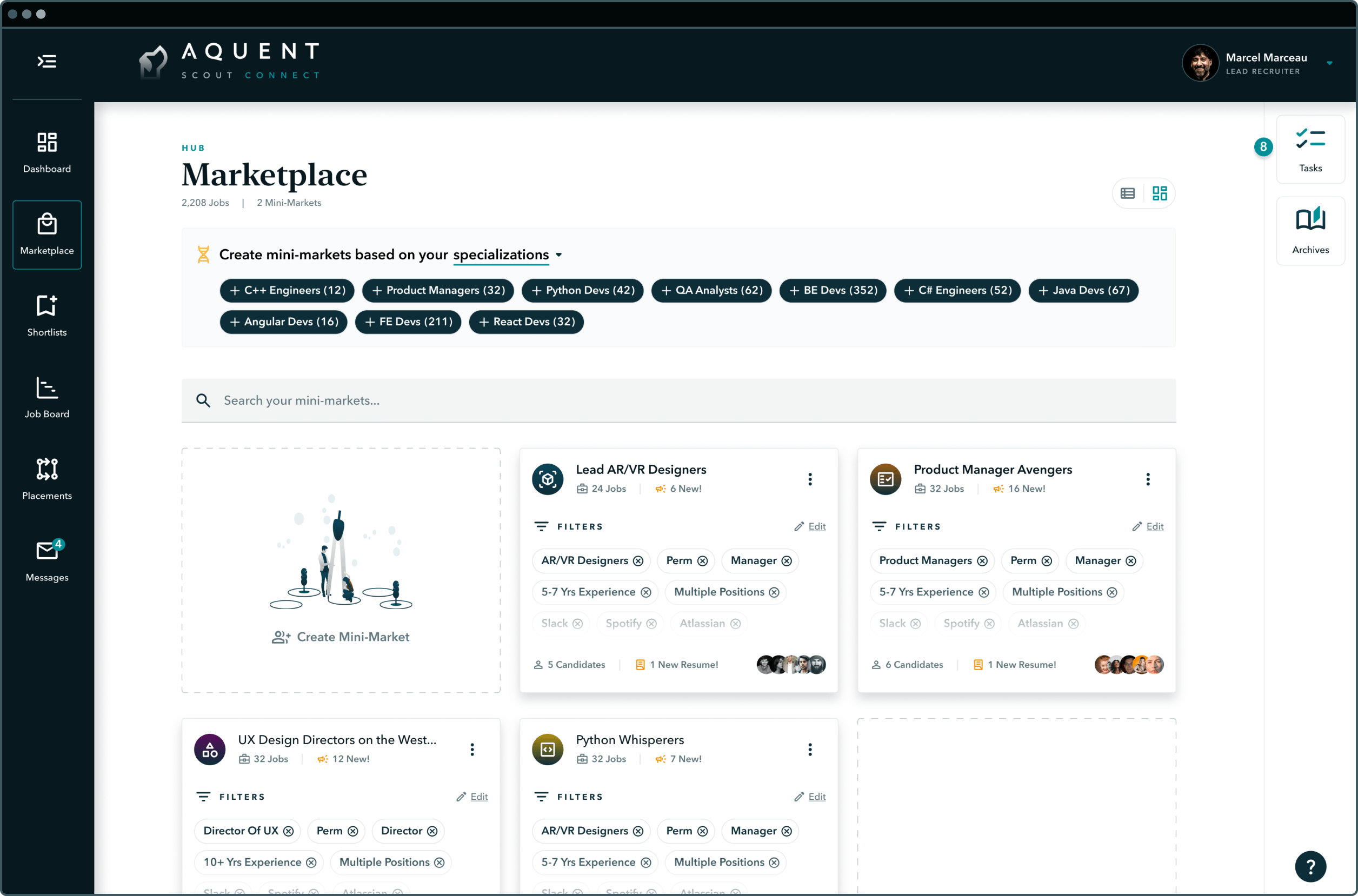
Once a user has created their third mini-market, the onboarding layout has served its purpose, and a new layout emerges to accommodate more mini-markets. The new layout is defined by a search bar and shorter cards to bring the second row above the fold.
Market hub
Suggested mini-markets
The first machine learning UI component to take form was the Suggested Mini-markets Callout. It suggests new mini-markets based on specializations, locations, or clients, by pulling user activity data and a user's self-identified attributes in onboarding.
3.1 Enter mini-market
Kind of like Bruce Lee's Enter the Dragon, but not as epic, this video showcases how users would enter into a mini-market from the market hub.
3.2 Restore archived mini-markets
Archiving is like the fengshui of the market hub: removing irrelevant mini-markets, while allowing users to restore them based on historical performance data.
Feature 4
The context bar
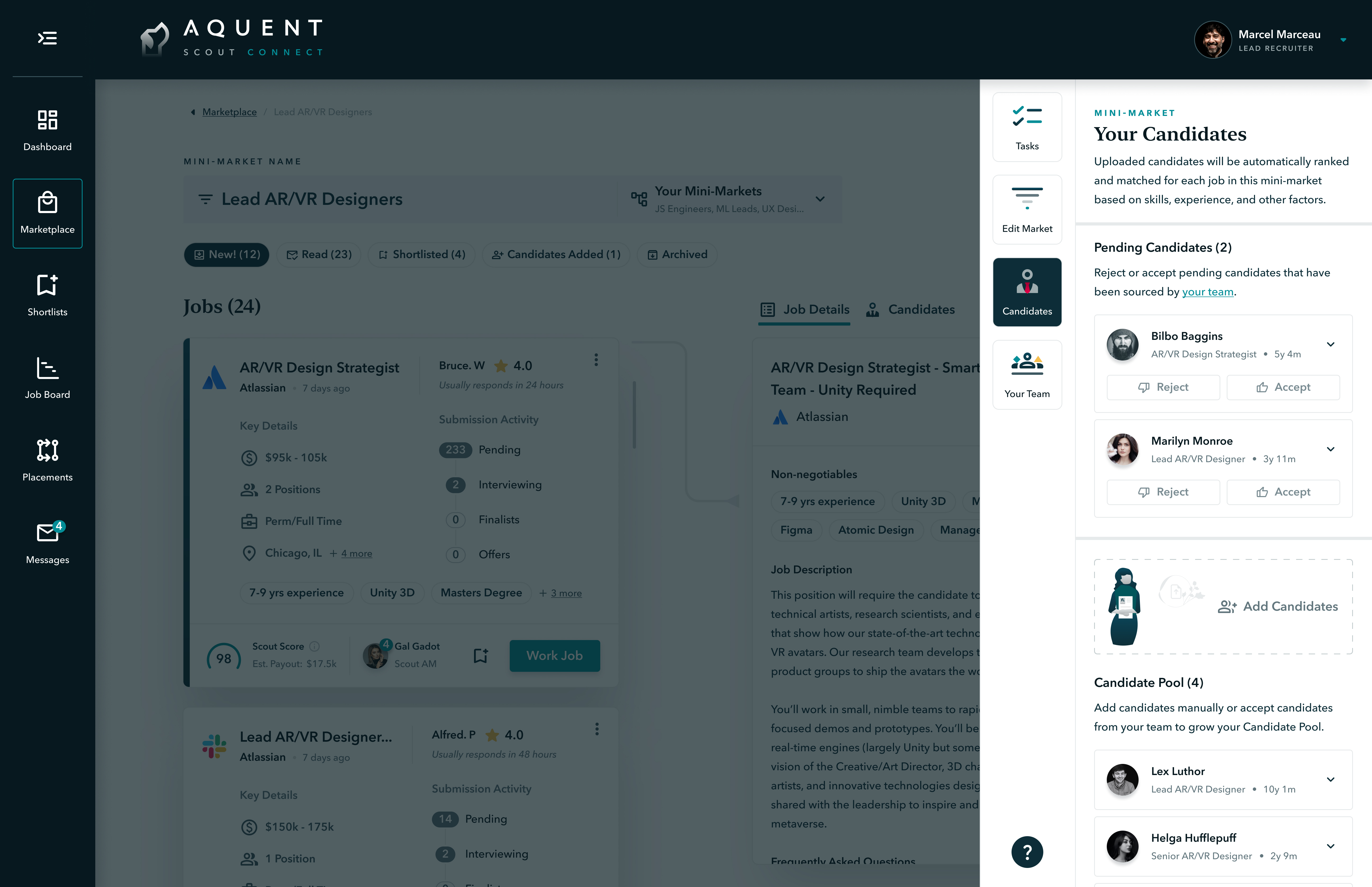
The Context Bar is a slideout pane that serves dynamic Content Blocks based on the user's context: i.e., what are they trying to accomplish, and what page are they on? And because each UI gives visual prominence to the core workflows, the Context Bar that neatly tucks away everything else including Tasks, Filters, Candidates, Your Team, and Archives.
.png)
Showing Context Blocks and slideout panes for Candidates, Search Preferences, Your Team, and Tasks.
Context bar
Dynamic block
The Context Bar triggers a slide-out pane that gives users finer insight and control over the content on the current page. It also shows different Blocks depending on which page the user is on. For instance, in the Mini-market, it displays Tasks, Filters, Candidates and Your Team, but in the Hub it only shows Tasks and Archives.
.jpg)
4.1 Tasks
As the core ML + UI component, Tasks empower users with page-level productivity tips to drive momentum.
4.2 Filters
Filters are the building blocks of mini-markets, shaping the search with job titles, desired earnings, and more.
4.3 Candidates
Leads can curate their talent network, review resumes, and accept or reject candidates that their team submits.
4.4 Your Team
The Your Team Block is where Leads can manage direct reports, chat, and view assignments. #teamsynergy
Outcome & results
The Scout Marketplace redesign set precedent for how to approach redesigning the Scout platform, incorporating research processes, incubator methodologies, creating a new atomic design system, and establishing the extent of change needed. The initiative was put on hold in January of 2023 after a large company restructure. Meanwhile, the product team has been exploring how we can incorporate Generative AI into the design.

"Christian is an extremely talented UX designer, and I would gladly hire him again if the opportunity presented itself. Christian was able to create a long-term design vision and articulate the incremental steps needed to get there."

Johan Bilean
CTO, Google, Ex-Aquent

"Christian transformed the way we looked at UX and was a game changer for our product organization. He is incredibly thoughtful in all his efforts and the results always challenged and excited those lucky enough to be a part of the process."

Jeffrey Simmons
Director of Product, Lightcast, Ex-Aquent

"Christian demonstrated a deep understanding of our users and diligently questioned the existing user journeys we had built for Scout. I believe Christian would be a valuable addition to any UX team aiming to elevate their work to new heights."

Matt Pozos
COO, Scout / Aquent
Up next
Continue exploring my work below.
.jpg)
.jpg)